

What AI Crawlers Actually Look For on Your Site
What AI crawlers look for is a specific set of signals: access, structure, entities, and freshness. Here is what each one checks and how to surface the signal.
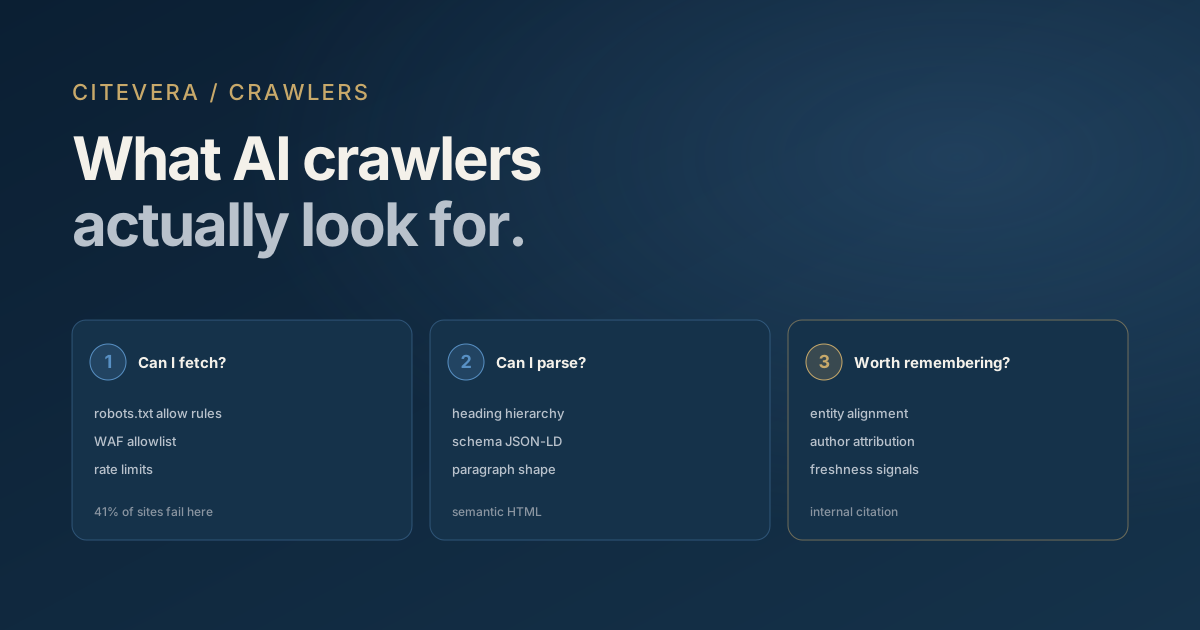
When GPTBot arrives at your site, it does not read your marketing copy the way a user does. It runs through a checklist of technical and structural signals to decide three things: can I fetch this, can I parse it, and is it worth remembering? This post covers what AI crawlers look for at each of those three stages and how to surface the signals they want.
The stakes are tangible. In February 2026, Duda analyzed 858,457 sites (a single-platform, correlational dataset) and found a 33x crawler visit gap between sites that got the signals right and sites that did not. What AI crawlers look for is not a mystery; it is a list.
Stage one: can I fetch this page at all?
Before anything else, the crawler needs to reach your page without being blocked. Three things determine whether it can.
robots.txt. AI crawlers respect robots.txt when explicit rules exist for their user agent. GPTBot, ClaudeBot, PerplexityBot, Google-Extended, and Applebot-Extended each look for their own named allow or disallow rules. A blanket User-agent: * rule is not enough; the crawler wants to see its specific name.
WAF and CDN rules. Cloudflare, AWS WAF, and similar services often block unknown automation traffic by default. If your WAF does not have an allowlist for AI crawler user agents, they get a 403 before they ever reach your robots.txt. This is the most common silent failure in AI search.
Rate limiting. Some sites rate-limit requests per IP. AI crawlers often fetch many pages in a short window. If your rate limits are too aggressive, the crawler gets partial coverage.
The fetch stage is where most sites lose. Forty-one percent of sites in the Duda study received zero AI crawler visits in the entire month. Most of those sites had not explicitly blocked crawlers. They had just not explicitly allowed them, and their WAF finished the job.
Our 2026 AI crawler user-agent reference lists the twelve user agents that matter today and the exact robots.txt rules each expects.
Stage two: can I parse this content?
Once the crawler fetches a page, the next question is whether it can extract structured meaning. What AI crawlers look for at this stage is semantic structure.
Heading hierarchy
The crawler reads H1, H2, H3 tags as the skeleton of the document. A page with one H1 and clear H2 sub-headings is parsed differently than a page where headings are replaced by styled divs. If your CMS outputs hero text as <div class="hero-title"> instead of <h1>, the crawler sees no heading at all.
Paragraph structure
AI crawlers extract citation-ready fragments at the paragraph level. A paragraph with three sentences and one clear claim is more citable than a paragraph with fifteen sentences and five interleaved ideas. The model prefers short, self-contained statements it can quote without context loss.
Schema markup
JSON-LD schema is the highest-confidence signal for parsing. Types like Organization, Article, FAQPage, HowTo, Product, and Review give the crawler structured data that complements free-text extraction.
Schema markup for AI search covers the specific types that move the needle and the fields each type requires.
Semantic HTML
Beyond headings, the crawler looks for <article>, <main>, <nav>, <footer>, and <aside> tags to understand which parts of your page are primary content versus navigation or ancillary content. Pages built entirely from generic <div> containers are harder to parse.
Stage three: is this worth remembering?
Parsing a page is not the same as prioritizing it. AI engines index everything they can read, but they prefer some sources over others. What AI crawlers look for at this stage is authority and freshness.
Entity alignment
The Organization JSON-LD block on your homepage with a complete sameAs array telling the crawler your LinkedIn, Crunchbase, Wikidata, and Google Business Profile links is the foundation of entity alignment. Without it, the crawler sees a site but cannot resolve it to a known entity in its graph.
Sites with Google Business Profile sync had a 92.8% crawl rate versus 58.9% without (Duda, 2026). That gap is the entity signal doing its work.
Author attribution
Person JSON-LD on articles with a linked author page and external author profiles (LinkedIn, Twitter, Mastodon) raises individual article authority. This matters for E-E-A-T signals that AI engines increasingly weigh.
Freshness
datePublished and dateModified on articles tell the crawler whether the content is current. Sites that update their cornerstone content quarterly signal an active authority. Sites that publish once and never update decay in citation weight over time.
Citation inside your content
Paradoxically, AI crawlers preferentially cite pages that themselves cite sources. When your article links out to authoritative references and attributes its statistics, the crawler reads this as a signal of rigor and is more likely to cite you in turn.
The priority list AI crawlers build
AI crawlers maintain an internal priority list of pages worth revisiting. What AI crawlers look for in deciding what makes the priority list:
1. Pages with high entity-alignment signals (homepage, about, authoritative resources) 2. Pages with deep content on a specific topic (not thin landing pages) 3. Pages with structured data (FAQ schema, HowTo schema, Article schema) 4. Pages that are updated frequently 5. Pages linked from your llms.txt if present 6. Pages with inbound links from external authoritative sources
Pages that match multiple criteria get crawled more often and weighted more heavily in citation selection.
Measurement
You can check what AI crawlers look for on your specific site by reviewing server logs. Filter for GPTBot, ClaudeBot, and PerplexityBot user agents. Which pages do they fetch most? Which pages do they never touch? The gap between the two lists is your priority list to fix.
Citevera's audit runs this check automatically. It reports which AI crawlers can reach your site, which pages they prioritize, and which signals on each page are passing or failing.
Common blind spots
Three issues come up repeatedly when sites audit what AI crawlers look for against what their site actually provides.
JavaScript-rendered content. AI crawlers can execute JavaScript, but they are less thorough than a logged-in user. Content that only appears after a client-side fetch may be missed. Server-rendering critical content is safer.
Pagination traps. Blog archives that load more posts via infinite scroll may only expose the first page to the crawler. Use paginated URLs with rel="next" and rel="prev" links.
Hidden content behind accordions. FAQ sections that hide answers inside collapsed <details> or JavaScript accordions may not be extracted. Use semantic <details> with visible text, or render all content and hide visually with CSS.
Key takeaways
- AI crawlers check three things in order: can I fetch, can I parse, is it worth remembering?
- Fetch failures are the most common; 41% of sites receive zero AI crawler visits.
- Parsing depends on heading hierarchy, paragraph structure, schema markup, and semantic HTML.
- Prioritization depends on entity alignment, author attribution, freshness, and in-content citation.
- JavaScript rendering, pagination traps, and hidden content are the most common blind spots.
What to do next
Run a free audit at scan.citevera.com to see exactly what AI crawlers see when they visit your site. The report shows which signals are passing, which are failing, and a ranked fix list by impact.
For deeper detail on individual signals, see Why 81% of your AI traffic comes from ChatGPT on the access layer and Answer engine optimization 2026: the complete playbook on the full funnel.