

Should You Allow AI Crawlers? The Strategic Answer
Should you allow AI crawlers is a strategic question, not just a robots.txt edit. Here is the decision framework with commercial implications.
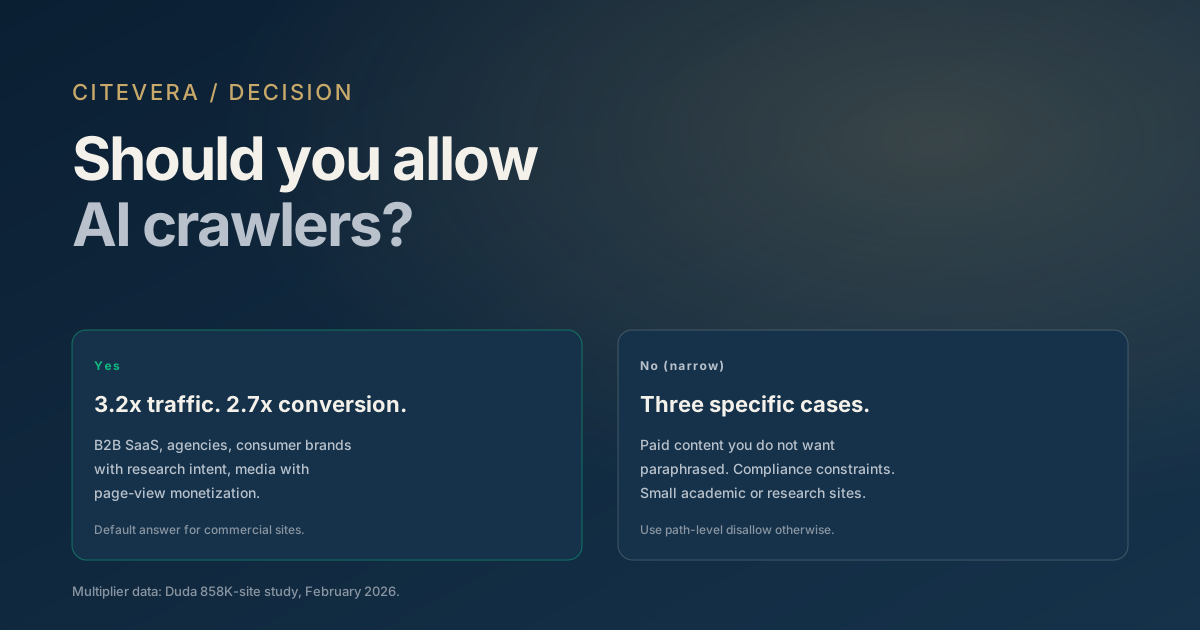
"Should we allow AI crawlers?" comes up in strategy meetings more often than it should given how one-sided the economics are. The answer for most commercial websites is yes, but the decision deserves a real framework rather than a reflexive yes or no.
This post covers the four scenarios where allowing AI crawlers is clearly correct, the three scenarios where blocking is defensible, and the middle cases where the decision should depend on specific attributes of your business. The framework is built on the public data and hundreds of strategy conversations Citevera has had with teams working through this question.
Why the question keeps coming up
Two arguments against allowing AI crawlers circulate in 2025 and 2026. Worth understanding both before the framework.
Argument 1: AI engines steal content without paying. The claim is that by allowing GPTBot or ClaudeBot to crawl your content, you are contributing to a system that profits from your work without compensation. This argument has legal weight in the ongoing publisher lawsuits but less commercial weight for most non-publisher businesses.
Argument 2: AI engines send less traffic than they take. The claim is that AI engines absorb your content and provide the answer in-interface, so the user never clicks to your site. Click-through rates from AI answers run 10 to 30%, versus 40 to 60% from Google top results.
Both arguments have merit. Both underestimate the opportunity cost on the other side of the ledger.
The case for allowing AI crawlers
> Not sure what your site declares? Check any URL against all 13 AI crawler agents - free, with the exact robots.txt rule that decides each verdict.
Four data points make the allow case for most commercial sites.
Traffic multiplier. Per Duda's February 2026 analysis (a single-platform, correlational dataset), sites allowing AI crawling averaged 527.7 sessions per month, versus 164.9 on sites that did not. A 3.2x gap.
Conversion multiplier. Form completions on AI-crawled sites averaged 4.17 per month versus 1.57 on uncrawled sites. A 2.7x lift on top of the traffic gap.
Category citation effect. B2B buyers asking "what are the best tools for X?" get a vendor list from the AI. Vendors in the list win the shortlist more often than vendors not in the list. Blocking AI crawlers removes you from the list.
Compounding trust loss. Competitors that are crawled build compounding citation weight over time. Being absent for six months does not just forgo six months of traffic; it pushes the catch-up work further out.
Our detailed cost of AI search invisibility calculation covers the commercial math for a typical B2B SaaS site.
Four clear-cut yes scenarios
Should you allow AI crawlers? Yes, if any of the following is true.
You run a B2B SaaS marketing site. Your buyers use AI to research vendor categories. Being cited is table stakes.
You run a marketing services agency. Your prospects ask AI for agency recommendations. Being cited in those answers is direct pipeline.
You run a consumer brand with high research intent. Categories like financial services, healthcare, home improvement, and travel all see heavy AI research use. Consumers ask AI before they buy.
You run a media site with direct monetization from page views. Counterintuitive maybe, but the 3.2x traffic multiplier applies here too. The click-through rate from AI answers is lower per citation, but the citation volume is higher. Net-net, most media sites gain traffic by allowing.
Three defensible block scenarios
Three cases where blocking AI crawlers is defensible.
Paid content you do not want summarized. Subscription newsletters, paid research reports, or gated premium content have a reasonable case to block. The model can paraphrase your thesis without subscribers clicking the citation.
Legal or compliance constraints. Some regulated industries (certain healthcare content, legal advice publishers, financial advisory firms) have compliance reasons to control how their content is cited. Blanket AI crawler access complicates the compliance posture.
Small academic or research sites where attribution confusion is a risk. Primary research papers hosted on a personal academic site may prefer to be cited through formal academic channels rather than paraphrased in AI answers with uncertain attribution.
Outside these three cases, blocking is usually an overreaction.
The middle cases
A few scenarios where the answer is "it depends."
Content licensing negotiations in progress
If you are in active negotiation with an AI company for a paid content deal, blocking may be a negotiating position. This is a publisher dynamic and rarely applies to smaller sites.
User data privacy concerns
If user-generated content on your site contains PII or sensitive user data, blocking crawlers is a safer default. The fix is usually gating the PII behind authentication, not blocking the whole site.
Competitive sensitivity on specific pages
If specific pages reveal proprietary process (internal methodology documentation, pricing tiers you want to keep out of competitive intelligence) you can path-level-disallow those while allowing the rest of the site.
Our robots.txt AI crawlers guide covers the path-level disallow syntax for selective blocking.
The "partial allow" middle ground
A pattern we see working well for teams that are on the fence: allow AI crawlers, but disallow specific paths that contain high-value or sensitive content.
User-agent: GPTBot
Allow: /
Disallow: /research/paid/
Disallow: /members-only/
Disallow: /internal-methodology/
This gives you the traffic and citation benefits of allowing AI crawling while preserving specific exclusivity where it matters. It also gives you a clearer story to tell internally than a blanket block: "we allow AI crawling with specific exclusions for paid content."
Common objections and responses
Four objections worth addressing directly.
"We do not want our content training models." Blocking AI crawlers does not prevent your content from training models. Much of your content is already in Common Crawl (CCBot) and may have been ingested before any robots.txt change. Blocking prevents new content from being added but does not remove what is there.
"Our content is behind paywalls; they cannot crawl it anyway." AI crawlers respect authentication. Paywalled content is already effectively blocked. The question only applies to your public marketing surface.
"Our competitors are blocking." Verify this. Anecdotally, many teams assume competitors are blocking when they actually are not. Check competitor sites' robots.txt yourself before assuming.
"The traffic benefit does not seem to be showing up." AI referral traffic lags AI crawling by 2 to 3 months. If you allowed crawling last month and are not seeing referral traffic yet, the mechanism is working; the feedback loop is just slower than SEO's.
How to make the decision
A four-step decision process.
1. Identify the commercial case on each side. Calculate the expected revenue impact of the 3.2x traffic lift. Calculate the expected revenue loss from citation-based paraphrasing. 2. Check for specific block-required scenarios. Paid content, compliance constraints, attribution concerns. 3. Default to allow unless a block-required scenario applies. The commercial math favors allow for most businesses. 4. Use path-level disallow for specific sensitive content. Preserve exclusivity where it matters without forgoing the broader benefits.
Most teams that work through this framework land on allow with a short disallow list for admin, staging, and any genuinely paywalled content.
Key takeaways
- Should you allow AI crawlers is a strategic question, not a reflexive robots.txt edit.
- The traffic multiplier (3.2x) and conversion multiplier (2.7x) favor allow for most commercial sites.
- Block scenarios are narrow: paid content, compliance constraints, small academic sites.
- Middle ground: allow with path-level disallow for sensitive sections.
- Default to allow unless a specific block-required scenario applies.
What to do next
Run a free audit at scan.citevera.com to see whether AI crawlers can currently reach your site. The report verifies robots.txt and WAF configuration and flags silent failures where a site thinks it has allowed crawling but has not.
For the precise robots.txt block to paste, see the complete robots.txt guide for AI crawlers.