
Developer Docs AEO: Getting Cited for Technical Queries
AI assistants answer a huge share of developer questions, mostly from docs. Stable URLs, versioned canonicals, runnable code, and llms-full.txt decide who is cited.
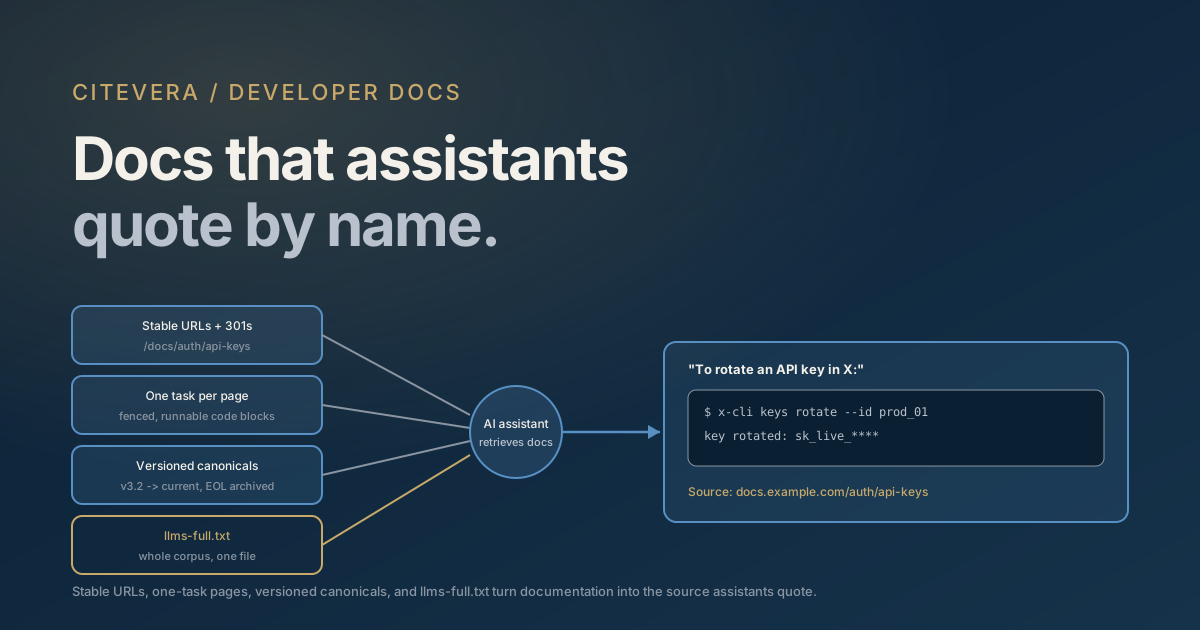
Developers moved a large share of their questions from search engines and Stack Overflow into AI assistants, and when an assistant answers "how do I authenticate against X" or "why does Y throw this error," the material it retrieves and quotes is overwhelmingly documentation. That makes your docs site a citation asset with direct commercial weight: the tool whose docs get quoted is the tool that gets recommended, installed, and defended in code review. If the assistant answers questions about your product from a competitor's comparison page or a stale forum thread, you lose accuracy and adoption at the same time.
Docs are also the best-positioned content type in all of AEO. They are already task-structured, already factual, already full of the code blocks assistants love to reproduce. The gap between "citable docs" and "invisible docs" is rarely writing quality - it is architecture: URL stability, version canonicalization, rendering, and machine-readable exports like llms-full.txt.
Here is what makes a docs site citable, mechanism by mechanism.
Stable URLs are the substrate of doc citations
Every doc citation is a URL an engine decided to trust. That trust accumulates per URL over repeated crawls and repeated successful retrievals - and a docs reorganization that changes every path resets it.
- Pick URL schemes you can keep for years. Path-based, lowercase, framework-agnostic: /docs/auth/api-keys survives a platform change; /docs/v2.3.1/getting-started_final does not.
- Redirect every moved page, one hop, 301. Docs teams reorganize constantly and assistants keep emitting the old deep links for months afterward - the same training-data lag that affects domain migrations applies at page level. A 404 on a URL the model remembers is an answer that ends "this documentation appears to have moved."
- Keep anchors stable too. Assistants frequently cite section anchors. Heading-slug churn from auto-generated IDs quietly breaks them.
In our audits, docs sites lose more AI visibility to reorganizations without redirect maps than to any content problem.
Versioned docs need a canonical strategy
Versioned documentation multiplies every page by the number of supported versions, and without explicit signals, engines split trust across near-identical copies - or worse, cite the v1 page for a v3 question.
The pattern that works: maintain an unversioned "current" URL (/docs/auth/) as the canonical home of each topic, serve versioned copies under explicit paths (/docs/3.2/auth/), and point rel=canonical from every versioned copy to the current URL. Mark end-of-life versions noindex or move them to a clearly labeled archive. State the version in the page content itself ("This page covers v3.x; for v2 see...") because assistants read prose, not just tags, and a model quoting your page will carry that version label into its answer - which is exactly what you want when APIs differ across versions.
The failure mode to avoid is the inverted one: canonical pointing at the oldest version because it accumulated links first, so every fresh crawl reinforces obsolete flags and renamed methods. If assistants keep answering with your deprecated API, check your canonicals before blaming the model.
Write pages an assistant can lift whole
Retrieval selects passages, so the unit of citability is the section, not the site. Docs have a natural advantage here if you enforce two disciplines.
One task per page. A page titled "Rotate an API key" that states the task, shows the code, and lists the failure modes is a perfect retrieval target. A 4,000-word "Security" page containing key rotation as its fifth subsection competes against itself for every query it could answer. Split by task, keep an H1-worth of scope per page, and open each page with two sentences that state what the task is and what the reader ends with - the direct-answer-first principle applies to docs exactly as it does to blog posts.
Runnable code blocks with language fences. Fenced blocks with correct language tags (``python, ``bash) are unambiguous extraction units - assistants reproduce them verbatim, tags and all. Make each block self-contained enough to run: imports included, placeholder credentials clearly marked, expected output shown. A code block that depends on three earlier snippets gets reproduced without them, and the assistant's user gets a broken paste - which they will attribute to your product. Pair every block with one plain-prose sentence saying what it does, because that sentence is what gets quoted around the code.
llms-full.txt: docs are the strong-fit case
The llms.txt convention defines two files: llms.txt, a curated index of your most important pages, and llms-full.txt, a single markdown file containing the actual content concatenated. For most marketing sites llms-full.txt is optional. For docs sites it is the single best-fit application of the whole convention, because docs are exactly what an LLM wants in one file: bounded, factual, task-structured text with code.
Documentation platforms increasingly generate both files automatically - Mintlify popularized the pattern, and plugins exist for Docusaurus and most static-site generators. If yours does not, generation is a build step: concatenate your markdown sources in sidebar order with clear page-boundary headers. Serve current-version content only, at the host root. Two cautions: keep it in sync with the site (a stale llms-full.txt gives assistants confident wrong answers, which is worse than none), and watch the size - past a few megabytes, split per product area as the spec's structure allows. The details live in how to write llms-full.txt, and how to generate llms.txt covers the index file. Validate what you ship with the free llms.txt checker.
The JS-only docs framework trap
Modern docs frameworks are JavaScript applications, and several popular setups ship pages whose content exists only after client-side rendering. Human readers never notice. AI crawlers do: most documented AI fetchers retrieve HTML and do not reliably execute JavaScript, so a client-rendered docs site can be a perfectly good product with zero extractable text. The mechanics are covered in SSR vs CSR for AI crawlers; the docs-specific checklist is short.
- Verify with curl, not a browser. Fetch key pages and confirm the body text and code blocks appear in the raw HTML. If you see an empty root div and a bundle script, assistants see the same.
- Prefer static generation. Docusaurus, Astro-based frameworks like Starlight, VitePress, Sphinx, and MkDocs all pre-render to HTML when configured normally. The trap is usually a custom in-app docs page or an embedded API console, not the framework default.
- Watch the API reference especially. Auto-generated references (OpenAPI viewers in particular) are the most commonly client-rendered section of otherwise static docs sites - and the section developers query most.
Measure it: your crawler logs already know
Docs sites have an unusually direct feedback loop, because AI crawler traffic shows up in server logs under documented user agents - GPTBot, OAI-SearchBot, and ChatGPT-User from OpenAI's roster, ClaudeBot and PerplexityBot likewise. Grep your access logs for these agents and look at three things: which doc pages they fetch most (your de facto citation inventory), whether they are hitting 404s from old reorganizations (redirect gaps, fix immediately), and whether on-demand fetchers like ChatGPT-User spike after releases (users asking assistants about your new features in real time). The full agent list is in our AI crawler user-agents guide, and the free AI crawler access checker confirms none of them are blocked at the edge before you go looking for them in logs.
Pair the log view with the answer view: run your top developer queries - "how do I install X," "X authentication example," your most-searched error messages - through the major assistants on a schedule and record whether your docs are the cited source.
Frequently asked questions
Should docs pages use schema markup?
It helps at the margins. TechArticle or APIReference types with dateModified give engines freshness and type signals, and BreadcrumbList clarifies the docs hierarchy. But for docs, content architecture - stable URLs, one-task pages, fenced code - carries far more weight than markup. Add schema after the architecture is right, not instead of it.
Do assistants cite docs from model memory or from live retrieval?
Both. Popular tools' docs are heavily represented in training data, so assistants answer many questions parametrically - sometimes with outdated APIs. Retrieval-backed modes fetch your live pages and correct that. You influence memory slowly (stable URLs, wide usage, llms-full.txt in training crawls) and retrieval quickly (rendering, redirects, canonicals), which is why the quick levers in this post are retrieval-side.
Is llms-full.txt worth it if my docs are already static HTML?
Yes, and the effort is low precisely because your sources are already markdown. Static HTML makes each page fetchable; llms-full.txt gives tools that ingest whole-corpus context - IDE assistants and agent frameworks especially - your entire current documentation in one request, in the format they parse best.
How should I handle deprecated product versions in docs?
Keep end-of-life docs online behind explicit version paths with canonicals to current pages, banner them as deprecated in prose, and exclude them from llms.txt and llms-full.txt. Deleting them outright breaks remembered deep links; leaving them unmarked gets them cited as current. Labeled-but-canonicalized is the middle path that works.
My docs get crawled but never cited. What do I check first?
Check rendering first (curl the pages), then page structure (are answers buried in long multi-topic pages?), then version canonicals (is the engine seeing five near-duplicates?). If all three pass, the gap is usually competitive: a Stack Overflow thread or tutorial answers the query more directly than your page does, and the fix is a one-task page that answers it in the first two sentences.
Score your docs like an engine would
Everything above is checkable from the outside, which means you can audit it before guessing. A Citevera audit scores a docs site's crawlability, extraction-readiness, and schema the way an answer engine's pipeline experiences them, and the free llms.txt and crawler access checkers linked above cover the two files that gate everything else. Developer docs are the rare content type that assistants actively want to cite - the work is making sure nothing in your architecture stops them.