

Is Your CDN Silently Blocking AI Crawlers?
Cloudflare now blocks AI crawlers by default on new zones, and WAF rules block them on old ones. How to audit every layer between your robots.txt and a 403.
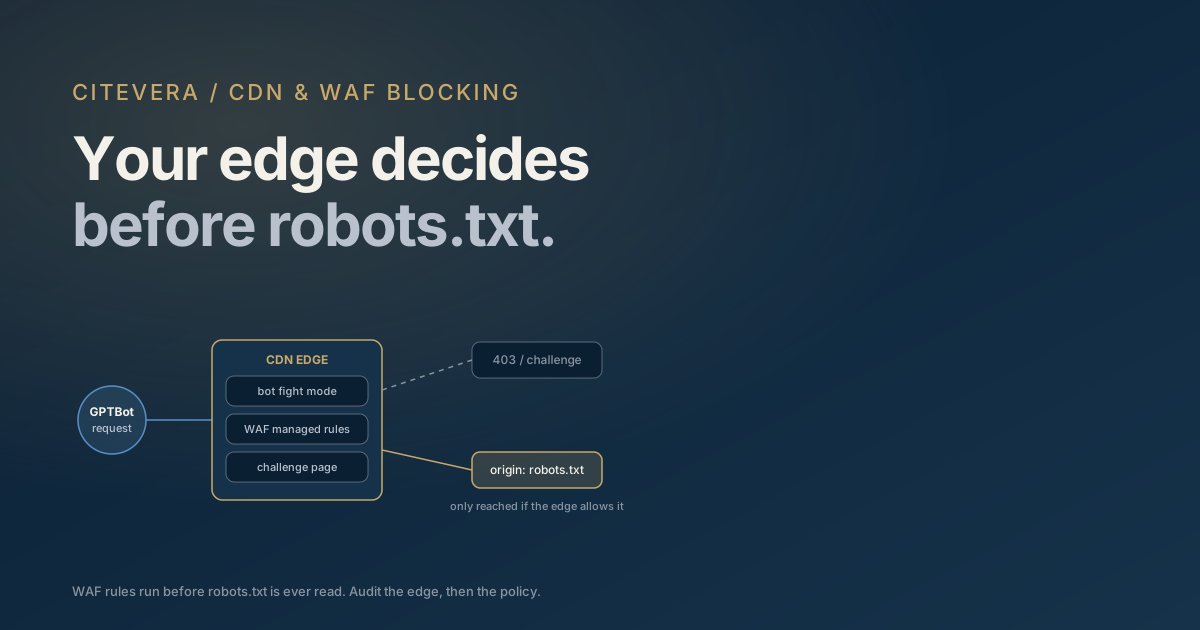
Your robots.txt can say "allow" all it wants. If your CDN or WAF sits in front of your origin and decides an AI crawler is hostile traffic, that crawler gets a 403 or a JavaScript challenge page, and your carefully written crawl policy never enters the picture. Since mid-2025, when Cloudflare started blocking AI crawlers by default for newly onboarded domains, this has become one of the most common silent failures we see in crawlability audits: the site owner believes AI engines can read the site, and the edge disagrees.
The fix is not complicated, but it requires auditing a layer most content teams never look at. This post walks through where CDN-level blocking happens, why the obvious test (curl with a bot user agent) gives you wrong answers, and how to verify what GPTBot, ClaudeBot, and PerplexityBot actually experience.
What changed in mid-2025
Cloudflare had offered a one-click "block AI bots" toggle since 2024. In July 2025 it went further: Cloudflare announced that new domains onboarding to its network would be asked whether to permit AI crawlers, with blocking as the default posture. That flipped the burden. Before, a site owner had to opt in to blocking. After, a new zone can block GPTBot and its peers without anyone on the content team ever making, or even seeing, that decision.
This matters because Cloudflare fronts a very large share of the web, and because the block happens at the edge. The crawler never reaches your origin, never reads your HTML, and depending on configuration may not even get a useful robots.txt. From the AI engine's side, your site simply is not retrievable.
Other vendors have equivalent machinery. AWS WAF Bot Control, Akamai Bot Manager, and Fastly's bot mitigation products all classify and act on automated traffic, and all of them can catch AI crawlers in generic bot categories even when no one intended to block AI specifically.
The four layers that can block an AI crawler
When you audit, check each of these independently, because any one of them can produce the block.
- Explicit AI-bot settings. Cloudflare's Security > Bots section includes a dedicated control for AI scrapers and crawlers. If it is on, verified AI crawlers are blocked regardless of your robots.txt. This is the deliberate layer, and it is fine if it reflects a real decision.
- Bot fight modes. Bot Fight Mode (free plans) and Super Bot Fight Mode (paid plans) act on traffic classified as automated. "Definitely automated" traffic can be blocked or challenged wholesale. AI crawlers are automated by definition, so a blanket "challenge automated traffic" setting catches them even though they appear on Cloudflare's verified bots list.
- WAF managed and custom rules. Managed rulesets, rate limiting, and custom rules written years ago for scraper defense ("block anything with bot in the UA", "challenge all non-browser traffic from datacenter ASNs") predate AI crawlers but match them perfectly. These are the rules nobody remembers writing.
- Challenge pages. This one deserves its own section.
Why challenge pages are invisible blocks
A JavaScript or managed challenge does not return a 403. It returns a 200-ish looking response containing an HTML page whose job is to run JavaScript, prove the client is a browser, and then pass the visitor through. Human visitors barely notice it.
AI crawlers cannot pass it. GPTBot, ClaudeBot, and PerplexityBot fetch HTML; they do not execute a challenge script, wait, and retry with a clearance cookie. So the crawler receives a page of challenge boilerplate instead of your content, or an outright block response once the challenge fails. Either way, the text AI engines index for your URL is not your text.
This is worse than a clean 403 in one specific way: a 403 is an unambiguous "no", while a challenge can look like a successful fetch in naive monitoring. If you are checking "did the request return HTML", the answer is yes. It is just the wrong HTML. When auditing, look at response bodies and at headers like cf-mitigated: challenge, not just status codes.
Why testing with curl and a spoofed UA lies to you
The intuitive test is to impersonate the crawler:
curl -A "GPTBot/1.2" https://yoursite.com/some-page
This is unreliable in both directions, and it is worth understanding why.
Cloudflare and other serious bot-management vendors do not identify GPTBot by its user agent string. They verify it against published IP ranges and network signals; OpenAI, Anthropic, and Perplexity all publish the ranges their crawlers use precisely so that verification is possible. Your curl request comes from your residential or office IP with a GPTBot costume on. To the bot-management layer, that is not GPTBot. That is an impersonator, which is a stronger block signal than almost anything else.
So the two failure modes are:
- False block. Your zone allows the real, verified GPTBot, but your spoofed request gets challenged as a fake bot. You conclude you are blocking AI crawlers when you are not.
- False pass. Your test from an allowed IP sails through a rule that would catch the crawler's datacenter ASN, or you test a path the WAF treats differently. You conclude you are open when you are not.
Curl is still useful for checking that robots.txt is served and for inspecting response headers. It is not useful as a verdict on whether the actual crawler gets through.
How to audit properly
Step 1 - read the zone configuration. In Cloudflare: Security > Bots (the AI crawler control and bot fight settings), Security > WAF (managed rules, custom rules, rate limits), and any Workers that gate requests. On other stacks, review the equivalent bot-management policy. You are looking for anything that acts on "automated", "non-browser", or "AI" categories.
Step 2 - read the logs. This is the ground truth. Filter your CDN security events or origin access logs for the real user agents: GPTBot, OAI-SearchBot, ChatGPT-User, ClaudeBot, Claude-User, PerplexityBot, Perplexity-User, Google-Extended (see our AI crawler user agent reference for the full list). If a crawler appears with 403s, challenges, or does not appear at all despite your content being the kind AI engines cite, the edge is your suspect.
Step 3 - check the policy layer separately. Robots.txt is a different control plane from the WAF, and they fail independently. A zone can serve a permissive robots.txt while the WAF blocks every crawler that tries to honor it. Our free AI crawler access checker reads your robots.txt and reports which AI crawlers your published policy allows or blocks, per bot. Pair its output with the log evidence from step 2: the tool tells you what you have declared, the logs tell you what the edge actually does, and the two must agree before you can trust either.
Step 4 - confirm with crawler behavior over time. After changing settings, watch the same logs for a week. Verified crawlers returning with 200s is the only end-to-end proof.
Blocking deliberately is a legitimate choice
None of this argues that you must allow AI crawlers. There are coherent reasons to block: you sell the content AI engines would summarize, you license data commercially, or you have made a considered call that training-data contribution is not worth it. We walk through that decision in should you allow AI crawlers, and the honest answer is that it depends on your business model.
The failure mode is not blocking. It is blocking by accident, at a layer nobody audits, while the marketing team invests in answer engine optimization that can never pay off because the crawlers funding those answers get challenge pages. If you block, block on purpose: state it in robots.txt too (see the robots.txt AI crawler guide), so your declared policy and your enforced policy match and you can change your mind later with one edit instead of an archaeology project.
Frequently asked questions
Does Cloudflare block AI crawlers on existing zones too?
The mid-2025 default applies to newly onboarded domains, which are asked about AI crawler access during setup with blocking as the default. Existing zones keep whatever settings they had, but many of them enabled the one-click AI-bot block earlier or run bot fight modes that catch AI crawlers anyway. Age of the zone is not evidence of openness; only the current configuration and logs are.
If my robots.txt allows GPTBot, is that enough?
No. Robots.txt is a policy document that compliant crawlers read and honor. WAF and bot-management rules are enforcement that runs before your policy is ever consulted. Both layers must allow the crawler: robots.txt so the bot chooses to crawl, and the edge so the crawl physically succeeds.
How do I know if a request really came from GPTBot?
Check the source IP against the ranges each vendor publishes, linked from OpenAI's bot documentation and the equivalent Anthropic and Perplexity pages. A GPTBot user agent from an unlisted IP is an impersonator, and its experience on your site tells you nothing about the real crawler.
Are challenge pages bad for regular SEO too?
Verified search crawlers like Googlebot are typically exempted from challenges by the major CDNs, so classic SEO usually survives settings that quietly break AI crawlers. That asymmetry is exactly why this problem hides: rankings look fine, dashboards look fine, and only the AI-crawler traffic is dying at the edge.
Find out what your edge is actually doing
The declared half of this audit takes about a minute: run your domain through Citevera's free AI crawler access checker to see exactly which AI crawlers your robots.txt allows or blocks today. A full Citevera audit goes further, scoring crawlability alongside your schema and content signals so an edge-level block shows up as the score-killer it is, with the fix spelled out. Whichever way your allow-or-block decision goes, make it a decision - not a default someone else picked for you.