

How to See AI Referral Traffic in GA4
Identify ChatGPT, Perplexity, Gemini, Copilot, and Claude referrals in GA4 with one regex on session source - and why the number you get is a floor, not the truth.
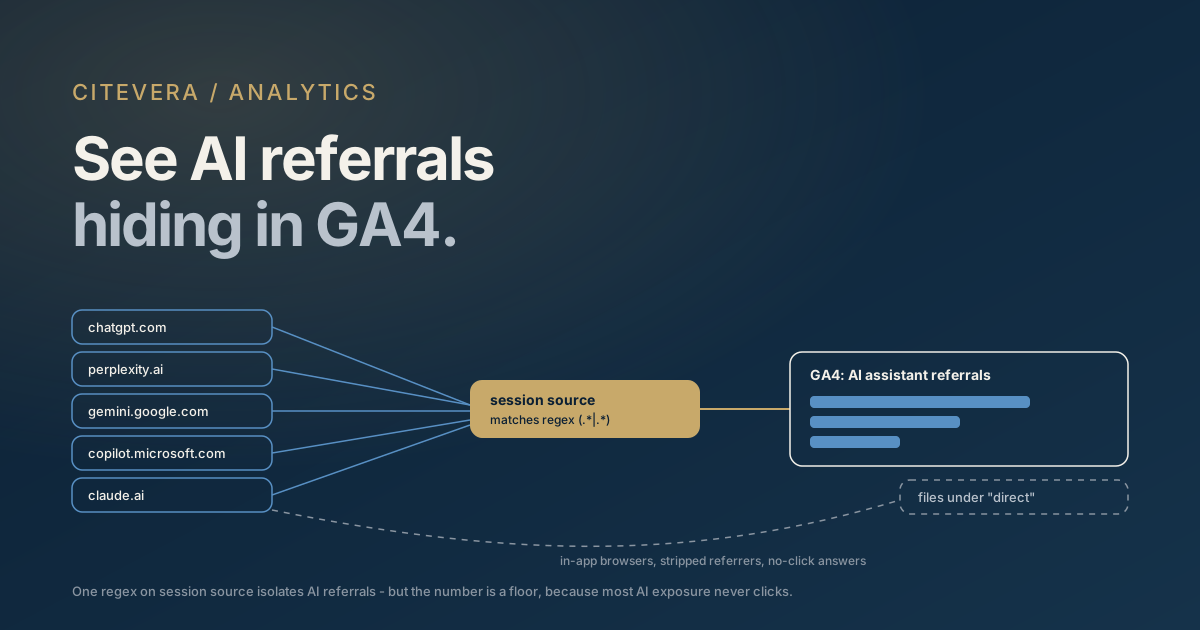
You can see AI referral traffic in GA4 today, with no new tooling: build an exploration or segment that filters the session source dimension against the referrer hostnames AI assistants pass along when a user clicks out of an answer - chatgpt.com, perplexity.ai, gemini.google.com, copilot.microsoft.com, and claude.ai. One regex on session source captures all five. That is the entire technique, and it takes about ten minutes to set up.
The more important half of this post is what the technique cannot show you. AI clicks arrive without UTM parameters, in-app browsers frequently strip the referrer entirely, and most AI exposure never produces a click at all. The number GA4 gives you is a floor - useful for trend direction, dangerous if you read it as your actual AI visibility.
Here is how to build the report, why it undercounts, and how to interpret what you see.
The referrer hostnames that identify AI traffic
The mechanism is ordinary web plumbing. When someone clicks a cited link inside an AI answer, their browser sends a Referer header naming the page they came from. GA4 reads that header and writes the hostname into the session source dimension. No AI vendor is doing anything special to announce itself - you are just reading the same referrer signal you have always had.
These are the hostnames that matter in 2026:
- chatgpt.com - ChatGPT on the web, including ChatGPT Search citations. Older sessions may still show
chat.openai.com, the previous domain, so keep it in your regex if you are analyzing historical data. - perplexity.ai - Perplexity's answer engine. Perplexity is unusually generous with outbound citations, so many sites see it as their largest AI referrer despite its smaller user base.
- gemini.google.com - the standalone Gemini app on the web. Note what this does not include: clicks from AI Overviews inside Google Search arrive with
googleas the source and are indistinguishable from ordinary organic clicks at the referrer level. - copilot.microsoft.com - Microsoft Copilot's consumer surface. Copilot answers embedded in Bing's results page will show
bing.cominstead, which you cannot cleanly separate from classic Bing organic. - claude.ai - Claude on the web. Claude cites sources when it searches, and those clicks carry the referrer like any other.
Resist the urge to add google.com or bing.com to your AI regex. Those hostnames blend AI-driven and traditional search clicks, and folding them in destroys the one thing this report is good at: isolating traffic you can confidently attribute to an AI assistant.
Build the exploration: one regex on session source
Step 1 - open a blank exploration. In GA4, go to Explore and start a blank exploration. Explorations let you filter on regex without touching your property configuration, so this is the safest place to start.
Step 2 - add dimensions and metrics. Import the dimensions "Session source / medium" and "Landing page + query string", and the metrics "Sessions", "Engaged sessions", and "Key events". Landing page matters more here than in most reports - it tells you which pages AI engines are actually citing, which is intelligence you can act on.
Step 3 - apply the regex filter. Add a filter on Session source with the condition "matches regex" and this pattern:
.*(chatgpt\.com|chat\.openai\.com|perplexity\.ai|gemini\.google\.com|copilot\.microsoft\.com|claude\.ai).*
The leading and trailing .* matter. GA4's "matches regex" condition performs a full match in explorations, so a bare hostname pattern silently fails against source values with prefixes or suffixes. Wrapping the alternation makes the pattern behave like a contains-match, which is what you want.
Step 4 - save it as a segment. Once the filtered table looks right, convert the filter into a saved segment named something like "AI assistant referrals". Segments can be reused across explorations and compared side by side against organic search or direct.
If you want this in standard reports rather than explorations, build a custom channel group: in Admin, under Data display, create a channel named "AI referral" with the same source regex, placed above the generic Referral channel so it wins the match. Custom channel groups apply from creation onward in standard reports, so build it early - it will not backfill the past in those surfaces.
Why utm-less AI clicks look like direct
AI engines do not decorate the links they cite. There is no utm_source=chatgpt waiting for you, because the engine is quoting your URL as it found it. That leaves the referrer as the only attribution signal - and the referrer is fragile.
Three mechanisms routinely destroy it:
- In-app browsers. A large share of ChatGPT, Perplexity, and Copilot usage happens in native mobile apps. When those apps open your link in an embedded webview, the webview often sends no
Refererheader at all. GA4 sees a session with no source and files it under direct. - Referrer policy. Any hop in the chain - the AI's redirect wrapper, an intermediate shortener, a strict
Referrer-Policy- can downgrade or drop the header before it reaches you. - Copy-paste behavior. Users frequently copy a cited URL out of an answer and paste it into a new tab, which is by definition a direct visit.
The practical consequence: if your AI referral segment shows movement, your direct traffic almost certainly contains an additional unattributable slice of AI-driven visits. When direct rises in lockstep with your AI referral segment, that is not a coincidence - it is the same phenomenon measured through a lossier pipe.
Most AI exposure never produces a click at all
Even a perfect referrer would only measure clicks, and clicks are the minority outcome in AI search. Pew Research Center's 2025 real-user panel found AI summaries appearing in roughly 1 in 5 Google searches; users who saw an AI summary clicked a traditional result on about 8% of visits versus about 15% without one, and clicks on links inside AI summaries happened on roughly 1% of visits. We keep the full set of numbers, with caveats, on our AI search statistics page.
Read that against your GA4 report and the shape of the problem is clear. The overwhelming majority of the times an AI engine reads, summarizes, or cites your content, no session is created anywhere. Your brand can be the substance of an answer seen by thousands of people while GA4 records a handful of sessions. Referral tracking measures the overflow, not the exposure.
That is why referral analysis and citation monitoring are different disciplines. GA4 tells you what happened after a click. To know what AI engines are saying and citing before any click exists, you have to query the engines themselves and track share of voice across repeated prompts.
Google's own AI surfaces: what you can and cannot separate
Google has been folding AI results into its reporting surfaces - Search Console reporting now includes AI Mode traffic within the Search results data, and Google has said AI Mode sits inside Search rather than beside it. Mechanically, that means clicks from AI Mode and AI Overviews reach your site as google / organic. There is no referrer-level distinction for you to regex against.
So treat the two Google surfaces differently in your model. The gemini.google.com hostname isolates the standalone Gemini app cleanly, and belongs in your AI segment. AI Overviews and AI Mode traffic lives inside your organic bucket, invisible to this method - its fingerprint shows up indirectly, as impression and click-through shifts in Search Console rather than as a separable GA4 source. Do not let a flat "AI referral" line convince you Google's AI surfaces are not touching your traffic; this report simply cannot see them.
Frequently asked questions
Does GA4 have a built-in AI traffic channel?
No. GA4's default channel grouping files these hostnames under generic Referral, mixed in with every other site that links to you. Until Google ships a dedicated channel, a custom channel group or a saved segment with the regex above is the way to get a persistent AI view in your property.
Why is my AI referral number so low?
Because it is a floor. In-app browsers strip referrers, copy-paste visits register as direct, and the large majority of AI exposure ends without any click, consistent with Pew's panel data on AI summaries. A low number does not mean AI engines are ignoring you - it means clicks are a weak proxy for AI visibility. Check what the engines actually say about you before concluding you are invisible.
Can I use UTM parameters to track AI referrals?
Not for citations. UTM parameters only exist on links you author - ads, emails, social posts. AI engines cite your canonical URLs as crawled, so there is nothing for your UTMs to ride on. The one place UTMs help is links you personally seed in sources AI engines quote, such as a profile page you control.
Which landing pages should I expect to see in the report?
Usually not your homepage. AI engines cite the specific page that answered the question, so expect deep content: comparison pages, definition-style posts, documentation, pricing. If one URL dominates your AI referrals, that page has citation traction worth studying and replicating - we broke down the pattern in why competitors get cited and you don't.
Measure the other side of the click
A GA4 segment shows you the trickle of visitors AI engines send. It cannot show you the answers those engines are generating about your brand hundreds of times a day, cite or no cite. Citevera's paid plans bundle citation monitoring across ChatGPT, Claude, and Gemini - repeated real prompts, tracked over time, so you can see whether you are mentioned, cited, or absent while your GA4 floor line catches only the overflow. Start with the referral segment this week; it is free and takes ten minutes. Then, when you want the numerator instead of the leftovers, see how the audit and monitoring work together.