

Schema Markup Validation: The Tools That Catch AEO-Breaking Errors Before Publishing
A broken schema block looks fine in the browser. Here are the validation tools and the CI workflow that prevent silent AEO failures from shipping to production.
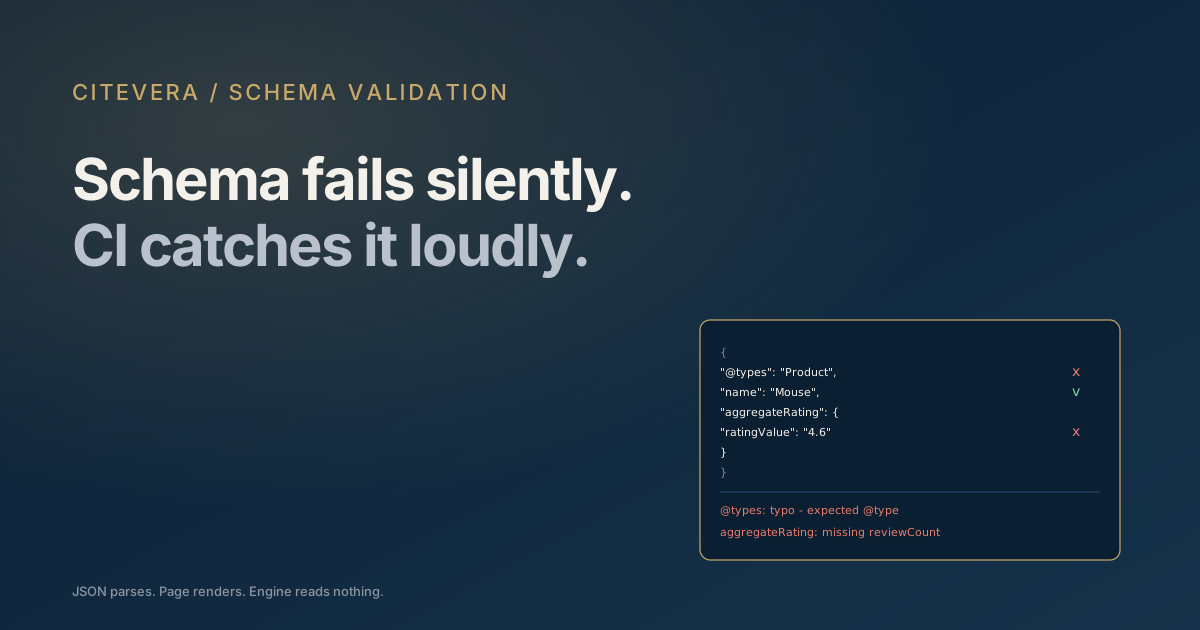
Schema markup fails silently. A typo in a JSON-LD block does not break the page visually. The page still renders, the user has the same experience, and the team has no idea anything is wrong. AI engines, however, see the broken schema, fail to parse it, and the page loses every citation signal that schema was supposed to provide. The discipline of validation - and the tools that automate it - is what separates AEO programs that ship working schema from those that ship optimistic JSON.
This post covers the validation tools worth using, the CI workflow that prevents regressions, and the recurring schema bugs validation catches.
Why schema fails silently and stays broken
Three structural reasons:
1. JSON-LD lives in the head and never renders visibly. Visual QA does not catch errors. 2. CMSes generate schema dynamically. Plugins, themes, and template logic produce output that is harder to inspect than hand-written code. 3. Schema errors do not throw build errors. Most build pipelines pass through JSON-LD without parsing, so syntactic and semantic errors propagate to production.
The result: most production sites have at least one broken schema block somewhere, and most teams do not know which page or which type until they audit.
The validators worth using
Five tools, each with a different role:
Schema.org Validator (validator.schema.org)
The most authoritative tool for syntactic and semantic validation. Paste a URL or JSON-LD block and it checks against schema.org definitions.
Strengths: catches typos in property names ("articleSection" vs "articleSection", missing required fields, type mismatches.
Limitations: does not enforce Google's specific rules; a passing block might still be rejected by Google Rich Results.
When to use: as the first line of defense for any new or modified schema.
Google Rich Results Test (search.google.com/test/rich-results)
Google's specific validator. Tests whether a block is eligible for Google rich results.
Strengths: shows the actual extracted preview; flags Google-specific requirements (e.g., AggregateRating needs reviewCount for Google to display).
Limitations: only covers Google's interpretation; does not validate everything schema.org allows.
When to use: for any schema type that should drive Google rich results (Product, Recipe, Event, FAQPage, HowTo, etc.).
Schema.org Markup Validator (Chrome extension)
Browser extension that surfaces structured data on the current page.
Strengths: lets you spot-check production pages quickly; works on any URL you can browse to.
Limitations: lighter validation than the dedicated tools.
When to use: during routine audits of production pages.
JSON-LD playground (json-ld.org/playground)
Tests JSON-LD compaction, expansion, and conversion to other RDF formats.
Strengths: useful when debugging cross-references between blocks (e.g., is your Product correctly referencing your Organization by @id).
Limitations: lower-level than schema.org validation; doesn't enforce vocabulary.
When to use: when entity-graph linkages are not behaving as expected.
Custom Node script for CI
A simple Node script that fetches a page, extracts JSON-LD blocks, parses them, and validates against expected types.
Strengths: runs in CI; catches regressions before deploy; can enforce site-specific rules.
Limitations: requires investment to build and maintain.
When to use: when schema is critical to your AEO program and ad-hoc validation is not sufficient.
The recurring schema bugs validation catches
Six bugs that show up across audits:
Property name typos
@types instead of @type. articleSection misspelled as artileSection. JSON-LD parsers are case-sensitive and tolerant of unknown properties, so the typo silently strips the property without error.
Missing required fields
Product schema without name. Article without headline. The block validates as JSON but fails the schema.org type definition.
Type mismatches
datePublished set to a Unix timestamp instead of ISO 8601. price set as a number when schema.org expects a string. review set as a single object when an array is expected.
Broken @id references
A Product schema referencing https://acme.example/#organization when the homepage Organization actually uses https://www.acme.example/#organization (different subdomain). The reference does not resolve.
Multiple conflicting blocks
Two Article schemas on the same page with different headlines. Two Organization schemas with different names. Engines see contradictory signals and pick one or downweight both.
Invalid URLs in sameAs, image, or url
Relative URLs ("/logo.png") instead of absolute. URLs with typos. URLs pointing to redirects or 404s.
These six bugs make up roughly 80% of the issues most validation runs surface.
The CI workflow that prevents regressions
A four-step CI workflow:
Step 1: Build-time JSON-LD extraction
After a build, walk the dist directory or fetch each page from a preview deployment. Extract all <script type="application/ld+json"> blocks.
Step 2: Parse and validate
Each extracted block:
- Parse as JSON. Fail the build if parsing throws.
- Verify required fields for declared
@type. Fail if missing. - Verify URL fields resolve (are absolute, well-formed). Fail if invalid.
- Verify
@idreferences match expected canonical IDs.
Step 3: Schema-specific assertions
Site-specific checks:
- Every blog post has Article schema with
publisherreferencing your Organization. - Every product page has Product schema with AggregateRating including reviewCount.
- Every page has at most one canonical Organization reference.
Step 4: Pass/fail report
If any assertion fails, fail the build. Include a clear error message pointing to the file and the issue.
A typical implementation is 200 to 400 lines of Node or Python and integrates with most CI platforms in under a day.
What to validate at each release
Three levels of validation cadence:
Per-commit validation
Schema for the touched pages. Cheap; runs in CI on every PR. Catches regressions immediately.
Per-deploy validation
Full site validation against a preview deployment. Catches issues that only appear in build output, not source.
Quarterly comprehensive audit
Manual review of schema strategy: are you using the right types? Are there schema types you should add? Are there pages with no schema that should have it?
The first two are automatable. The third is editorial work.
Validation for content team workflows
Engineering owns the CI; content authors need lighter-weight checks:
A "validate this draft" tool in the CMS
A button that pushes the draft URL to schema.org validator and Google Rich Results Test, returning a pass/fail. Authors use it before publishing.
A monthly schema health email
Automated report listing the top 20 pages with schema warnings. Goes to the content team for triage.
Documentation for common patterns
A wiki page or runbook listing the schema patterns the site uses with examples. Reduces drift over time.
These workflows turn schema validation from "engineer-only" to "team-wide" and catch more issues before they ship.
When schema validation reveals deeper problems
Sometimes a validation run reveals:
- No schema at all on important pages. A theme migration or CMS upgrade stripped schema.
- Different schema on different page types. Inconsistent strategy across blog vs product vs landing.
- Outdated schema types referencing deprecated schema.org definitions.
These are not bugs; they are gaps in the schema strategy. Validation surfaces them; the fix is editorial and architectural, not just code.
Tools to avoid or use cautiously
Two tools worth flagging:
Online schema generators
Many free tools exist. Most generate basic Article or Organization schema correctly. Be cautious with complex types (Event, Recipe, Product variants); generators often miss nuances. Validate the output before shipping.
CMS plugins that auto-generate schema
WordPress and other CMS plugins often inject schema automatically. The output is sometimes incorrect, often incomplete, and occasionally conflicts with manual schema you have shipped. Audit plugin output and either rely on plugins fully or override them fully; mixing is the worst of both worlds.
Key takeaways
- Schema fails silently because it does not affect page rendering or throw build errors.
- Schema.org Validator and Google Rich Results Test are the two essential validators; use both.
- Six recurring bugs (typos, missing required fields, type mismatches, broken @id references, conflicts, invalid URLs) cause most issues.
- A CI-integrated validation workflow prevents regressions; a 200 to 400 line script is enough for most sites.
- Editorial workflows (CMS validation buttons, monthly health emails) extend validation to content authors.
What to do next
Run a free audit at scan.citevera.com to see whether your top pages ship valid schema and which schema types are missing. The report includes a per-page schema validity grade.
For the content side of schema strategy, schema markup priorities for AI search covers which types to invest in first.