

Semantic HTML for AI Extraction: Beyond Divs
AI parsers use main, article, nav, and aside to find your content and strip the chrome. Div soup forces error-prone guessing. Here is what each element signals.
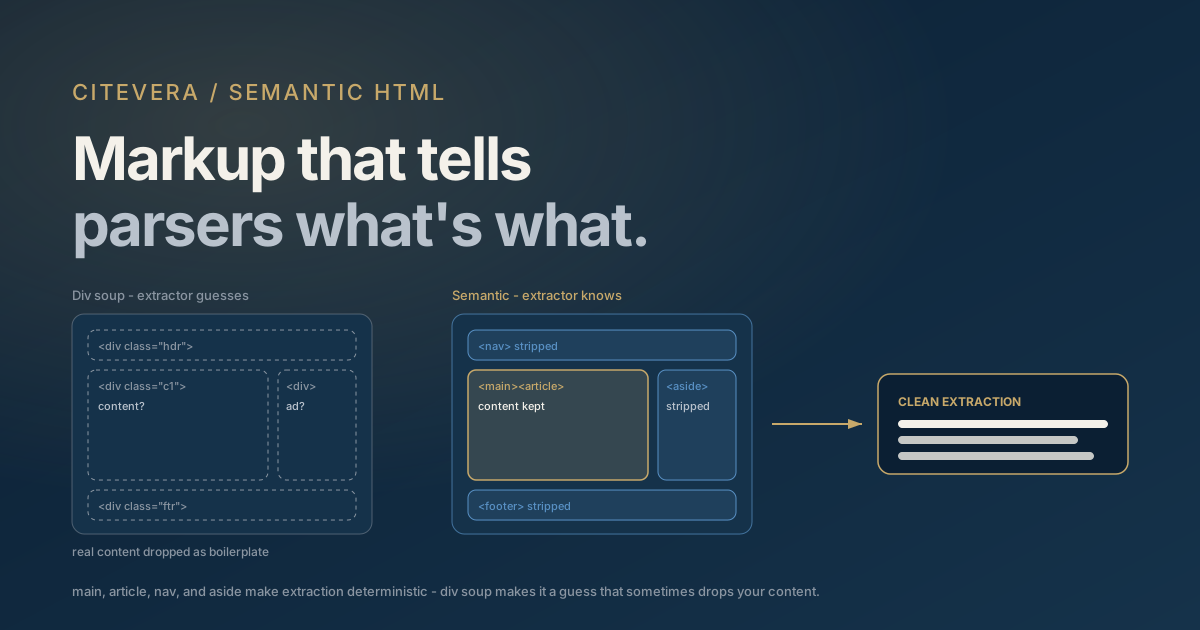
Before an AI engine can cite your content, something has to decide which parts of your HTML are content. A typical page is mostly chrome: header, nav, sidebar, cookie banner, footer, related-posts widget, newsletter form. Extraction pipelines exist to strip all of that and keep the article - and they make the keep-or-strip decision using your markup. Semantic elements like main, article, nav, and aside answer the question directly. A page built entirely from anonymous divs forces the extractor to guess, and extractor guesses are wrong often enough that real content gets discarded as boilerplate.
That's the entire case for semantic HTML in AEO, and it has nothing to do with abstract "best practices". The elements defined in the WHATWG HTML Standard are a machine-readable API for your page's anatomy. Use it and extraction is deterministic. Skip it and you're betting your citations on a heuristic's mood.
How extractors decide what counts as content
The tools that turn raw HTML into clean text - Mozilla Readability (the engine behind Firefox reader mode), Trafilatura (widely used in ML data pipelines), and the proprietary equivalents inside AI crawl stacks - share a common architecture. First they look for explicit structural signals: is there a main? An article? Elements the spec defines as non-content, like nav and aside? Where those exist, extraction is mostly a matter of trusting them.
Where they don't exist, the extractor falls back to scoring heuristics: text density per node, link density (navigation is link-heavy, prose is not), paragraph counts, class and id name hints, position on the page. These heuristics work impressively often and fail in predictable ways - a link-rich resource section gets classified as navigation and dropped, a comment thread outscores a short article, a sidebar CTA with a long paragraph gets kept as body text.
The failure isn't hypothetical, and it isn't visible to you. When an extractor drops your key section, the engine never tells you - your page is simply retrieved with that passage missing, and the citation goes to whoever's page still contained the answer after cleaning. Semantic markup is how you take the guessing out of the loop: an explicit main short-circuits the entire heuristic cascade.
The elements that do extraction work
Each of these maps to a concrete parser behavior. This is what to reach for instead of a div:
main- declares the page's primary content region, exactly one per page. The single highest-value element: extractors that find it can discard everything outside it with confidence. See the main element reference.article- a self-contained composition that makes sense on its own: a blog post, a product card, a docs page. Wrapping the post in article tells the parser "this unit is the citable thing", and on listing pages, multiplearticleelements cleanly separate items.section- a thematic grouping, ideally with its own heading. Reinforces the passage boundaries that chunking relies on.nav- navigation. Extractors strip it. This is a feature: your menu anchor text stops polluting your body text. A table of contents belongs innavtoo - it's navigation you want recognized as such.aside- tangential content: sidebars, pull-quotes, related links, ads. Marks content for de-prioritization or removal so it doesn't dilute your main text.header/footer- withinbody, site chrome; withinarticle, the article's own metadata block (title, author, date). Both usages help a parser separate metadata from prose.figure+figcaption- binds an image, chart, or code sample to its explanation. The caption travels with the figure in extraction instead of floating as an orphan paragraph.timewithdatetime-<time datetime="2026-08-18">August 18, 2026</time>gives parsers an unambiguous, machine-readable date. Freshness matters to answer engines, and a parseable date beats a string the parser must interpret.dl/dt/dd- definition lists: term-definition pairs in markup form. A glossary or spec sheet in adlis pre-structured data, ideal for the definition-shaped queries engines answer constantly.
None of this changes rendering in any way users notice. It changes what a machine can prove about your page.
Heading hierarchy: the outline is part of the semantics
Semantic sectioning collapses without a sane heading outline, because headings are how chunkers segment prose into passages and label them. The rules are short. Use exactly one h1, matching the page's title. Start body sections at h2 and nest downward without skipping levels - an h4 directly under an h2 breaks the outline a parser reconstructs. Never pick a heading level for its font size; that's what CSS is for. And never fake headings with <div class="heading-xl"> - a styled div contributes nothing to the document outline, so the section below it has no label and no boundary. We cover how those passage boundaries drive retrieval in what AI crawlers look for.
Why div soup fails machines
The counterargument you'll hear: "extractors have gotten good at div soup, and our classes are descriptive - .sidebar, .post-body, .site-nav." Three problems with relying on that.
First, class names are private vocabulary. The HTML spec gives nav a defined meaning every parser can rely on; .navigation-wrapper-v2 means whatever your team decided in 2021. Some heuristics do sniff common class names, but that's a soft hint applied inconsistently across tools - and hashed, minified class names from CSS-in-JS frameworks (class="css-1x2y3z") carry no hint at all.
Second, heuristics degrade at the margins, and the margins are where you compete. A conventional blog layout survives heuristic extraction fine. The pages that get mangled are the interesting ones: heavily componentized marketing pages, docs with embedded demos, comparison pages with dense link grids, calculators with surrounding prose. Those are frequently your money pages.
Third, you can't see the failure. There's no console warning for "Trafilatura dropped your FAQ as boilerplate". The only symptom is the slow one - passages from your page never appearing in answers - and by the time you notice, you're diagnosing months of missed citations. Structure is cheap insurance against an invisible failure mode.
It's worth saying that semantic markup only helps if the crawler receives it: elements assembled client-side by JavaScript never reach the majority of AI crawlers that don't execute JS. Server-render first - see SSR vs CSR for AI crawlers - then make what's rendered semantic.
Auditing your pages in ten minutes
You don't need tooling to find div soup. Four checks:
- View source, not the inspector. Load your key page, hit view-source, and search for
<main,<article,<nav,<aside. The inspector shows the post-JavaScript DOM; view-source shows what most AI crawlers actually receive. Nomainin view-source means every extractor is guessing. - Read the accessibility tree. In Chrome DevTools, the Elements panel's Accessibility pane shows the page as assistive technology sees it - which is close kin to how extractors see it, since both consume structure rather than pixels. If the tree is a featureless pile of "generic" containers, your page has no machine-readable anatomy.
- Trigger reader mode. Firefox reader view runs Readability itself. If reader mode drops sections, mangles order, or includes sidebar junk, extraction pipelines are plausibly doing the same.
- Fetch like a bot.
curl -A "GPTBot" https://yoursite.com/page/and read the raw response. This combines the rendering check and the structure check in one shot - the elements have to be present in this output to exist for GPTBot or ClaudeBot at all.
Fixing findings is usually low-risk template surgery: swap the outermost content wrapper to main, the post wrapper to article, the menu wrapper to nav, the sidebar to aside. Class names and styling stay untouched; you're adding meaning, not redesigning.
Frequently asked questions
Does semantic HTML directly improve AI citation rankings?
There's no ranking boost to claim, and no credible way to measure one in isolation. The mechanism is preservation, not promotion: semantic structure determines whether your content survives extraction intact and correctly segmented. A passage that gets stripped as boilerplate can't be retrieved, and a passage that can't be retrieved can't be cited, regardless of quality.
Is ARIA a substitute for semantic elements?
No. The first rule of ARIA use, per the spec's own guidance, is to prefer native elements - role="navigation" on a div is a patch for markup that couldn't use nav. Native elements carry their semantics in every parser automatically, including ones that ignore ARIA attributes entirely. Use ARIA to fill genuine gaps, not to avoid restructuring.
Do div-based component frameworks like React rule out semantic HTML?
Not at all - JSX renders whatever elements you write, so <main>, <article>, and <nav> work identically to divs. The problem is habit, not tooling: component libraries default to divs and nobody overrides them. Most frameworks let you fix the rendered element per component, and the change is invisible to users.
Should I use section or div for generic grouping?
Use section when the group is thematic and has (or deserves) a heading; keep div for purely presentational wrappers like layout grids and spacing containers. That split is exactly the signal you're sending: section says "content boundary", div says "ignore me, I'm scaffolding". Wrapping everything in section indiscriminately just recreates div soup with a different tag.
Find out what extractors keep from your pages
The whole problem with extraction failures is that they're silent. A Citevera audit reads your pages the way parsers do - raw HTML, structure first - and scores what survives, flagging missing landmarks, broken heading outlines, and content that's likely to be stripped as chrome, with the corrected markup ready to paste. If you want a two-minute preview of how bots experience your site, the free AI crawler access checker is the place to start.