

Pagination, Infinite Scroll, and AI Crawlers
AI crawlers don't scroll and rarely execute JavaScript, so infinite scroll hides everything below the first batch. Real paginated links keep archives crawlable.
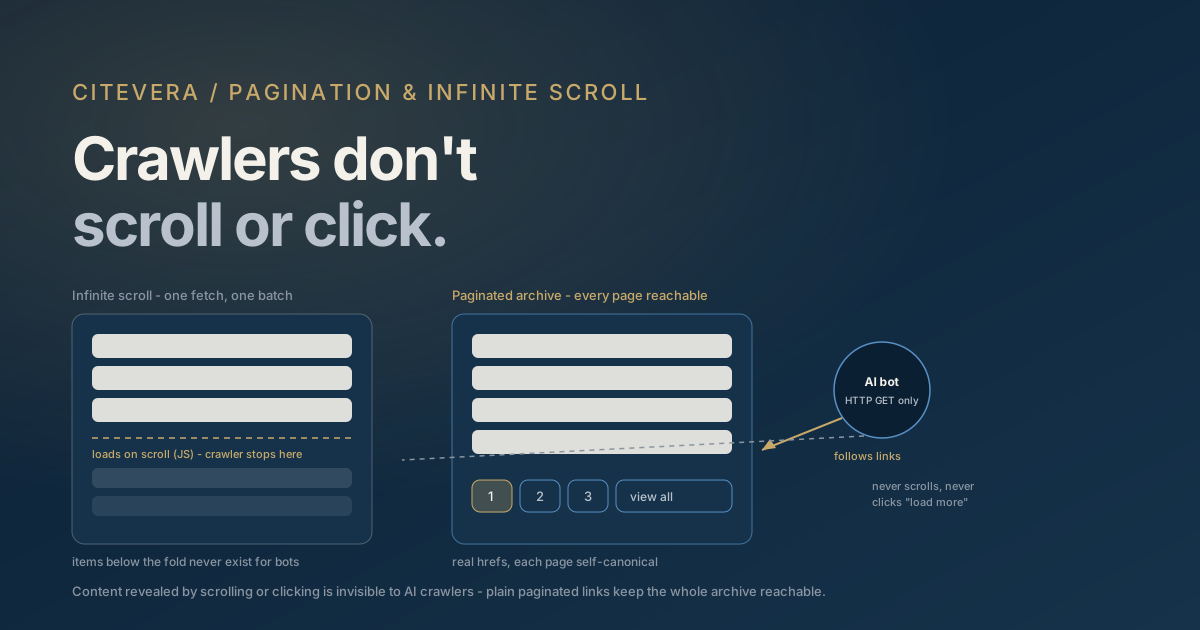
An AI crawler is not a browser with a mouse wheel. It sends an HTTP GET, receives HTML, and moves on - no scrolling, no clicking "Load more", and in most cases no JavaScript execution at all. That means every item your archive reveals through infinite scroll simply does not exist for GPTBot, ClaudeBot, or PerplexityBot. If your blog index shows ten posts and loads the rest on scroll, the crawlers see ten posts. The other two hundred are unreachable through that page, and any of them not discovered some other way may never be fetched, parsed, or cited.
The fix is old-fashioned and completely reliable: paginated archives with real <a href> links, each page fetchable by plain HTTP and canonicalized to itself. This post covers why scroll-based loading fails mechanically, what correct pagination looks like in 2026, the difference between what listing pages and detail pages need to deliver, and how to test all of it with curl in five minutes.
Why infinite scroll is invisible to AI crawlers
Infinite scroll works by watching viewport position - typically via IntersectionObserver - and firing a JavaScript fetch for the next batch of items when a sentinel element approaches the screen. Every step of that chain assumes a rendering browser: a viewport, a scroll position, script execution, and an async request after page load.
AI crawlers break the chain at the first link. Most execute little or no JavaScript - we map exactly which crawlers render what in SSR vs CSR for AI crawlers - so the observer never registers, the fetch never fires, and the "next batch" never exists. Even Google's rendering pipeline, the most capable of the lot, does not scroll pages or click buttons during rendering; Google's own pagination guidance is explicit that content loaded only on user interaction won't be seen.
"Load more" buttons fail identically - a button wired to a JavaScript handler is interaction-gated content, and crawlers don't interact. The variant that works is a "load more" that is actually an <a href="/blog/page/2/"> styled as a button, with JavaScript progressively enhancing it for humans. Same UX for users, and a plain link for everything that can't run your script.
Note what this failure costs you. Listing pages are how crawlers discover deep content: an article that fell off page one of your blog index and is only reachable via scroll-loading is an article whose freshness updates stop being noticed, whose new URL never gets found, and whose citations decay quietly.
Correct pagination in 2026
The load-bearing rules, in rough priority order:
- Real anchor links to every page.
/blog/page/2/,/blog/page/3/, and so on, present as<a href>elements in the server-rendered HTML. Numbered page links are better than a lone "next" link because they shorten the click depth to old pages - reaching page 40 through 39 sequential "next" hops is a depth few crawl budgets survive. - Every page self-canonicalizes. Page 2's canonical URL is page 2, not page 1. Canonicalizing all paginated pages to the first page tells crawlers the deeper pages are duplicates, which invites them to be skipped - and everything only linked from them becomes undiscoverable. This is the single most common pagination mistake we see; the full reasoning lives in canonical tags and AI crawlers.
- Each page is a real, distinct URL that returns complete HTML for its slice of items via plain GET. Query-string pagination (
?page=2) works fine; fragment pagination (#page=2) does not, because fragments never reach the server. rel="prev"andrel="next"are optional history. Google announced in 2019 that it no longer uses them as an indexing signal, and no AI crawler documents honoring them. They're harmless as semantic annotations and some parsers may still read them, but they fix nothing - the actual links in the body are what get followed. Don't ship them instead of visible links.- Keep paginated pages indexable.
noindexon page 2+ is a legacy tactic that, combined with modern link-following behavior, can cut off discovery of everything they link to. If you don't want thin archive pages competing in results, solve that with content, not by hiding the pages that carry your internal links. - Stable ordering. Newest-first with stable URLs means an old post's archive position changes every time you publish. That's unavoidable, but it's another reason numbered links and sitemaps matter: they give crawlers routes to content whose "page number" drifts.
Listing pages vs full content
A listing page has one job for crawlers: discovery. It doesn't need - and shouldn't have - the full text of every item. Title, link, a one-or-two-sentence excerpt, and a date per item is ideal: enough context to make the link's subject clear, not so much that the archive page competes with the article for the article's own queries.
The detail page has the opposite job: it must carry everything, server-rendered. A pattern we regularly see in audits is inverted effort - a beautiful, fully server-rendered archive listing linking to detail pages that hydrate their content client-side. The crawler follows a perfect link into an empty shell. Discovery succeeded; extraction got nothing.
For long individual articles split into multiple pages ("continued on page 2"), the calculus is different from archives. A multi-page article splits its own passages across URLs, which weakens each page as a self-contained citation source. Prefer one long page for content; use pagination for collections of many items, which is the problem it actually solves.
The "view all" escape hatch
For medium-sized collections, a "view all" page is the belt to pagination's suspenders: one URL containing every item, linked from the paginated pages. Crawlers that find it get the entire collection in a single fetch, with zero depth problems.
It stops being viable when the page gets huge - hundreds of items make for multi-megabyte HTML, slow responses, and possible truncation during ingestion. A reasonable rule: if "view all" stays under a couple hundred items and renders fast, offer it and let it self-canonicalize; beyond that, rely on numbered pagination plus sitemaps.
And sitemaps are the true safety net for everything above. An XML sitemap listing every content URL gives crawlers a discovery path that bypasses archive structure entirely - pagination problems stop being fatal and become merely inefficient. If you fix nothing else this week, fix that; our guide to XML sitemaps for AI crawlers covers the details. Sitemaps complement pagination rather than replacing it, though: links also carry context and internal-linking signals that a sitemap entry doesn't.
Test it with curl in five minutes
Every claim above is verifiable from your terminal, because you can fetch your pages exactly the way a non-rendering crawler does.
- Fetch the archive raw:
curl -s https://yoursite.com/blog/ | grep -c '<a '- then compare against what you see in a browser. If the browser shows 30 item links and curl shows 10, the other 20 are script-loaded and invisible. - Confirm page 2 exists and responds:
curl -s -o /dev/null -w "%{http_code}" https://yoursite.com/blog/page/2/- you want a 200, not a 404 (pagination routes not server-implemented) or a redirect to page 1. - Check the canonical on deep pages:
curl -s https://yoursite.com/blog/page/2/ | grep canonical- the URL in the tag should be page 2 itself. - Verify pagination links are in the HTML:
curl -s https://yoursite.com/blog/ | grep 'page/'- numbered links should appear as plain hrefs. - Spot-check a detail page: fetch an article URL and grep for a phrase from the middle of the article. Present in curl output means present for crawlers.
Run the same fetches with a bot user agent (curl -A "GPTBot" ...) to catch the separate failure mode of your CDN or bot protection blocking AI crawlers outright - a different problem, but one with identical symptoms.
Frequently asked questions
Does infinite scroll hurt my existing AI citations?
It doesn't remove content that engines already fetched, but it starves future crawling. Items buried behind scroll-loading stop being rediscovered from your archives, so updates go unnoticed and new posts rely entirely on sitemaps and external links for discovery. Sites usually notice as a slow decline in citations of newer content rather than a sudden drop.
Can I keep infinite scroll for users and still be crawlable?
Yes - that's the recommended pattern. Implement real paginated URLs with plain anchor links in the server-rendered HTML, then layer scroll-loading on top as progressive enhancement for browsers. Users get the seamless feed, crawlers get the numbered pages, and the "load more" control should be an actual link under the script.
Should paginated pages canonical to page 1 or to themselves?
To themselves, always. Each paginated page holds unique items, so it isn't a duplicate of page 1, and claiming it is tells crawlers to ignore it along with the links it carries. Canonical-to-first-page is how entire archive tails silently vanish from crawl coverage.
Do rel="next" and rel="prev" still matter?
As an indexing signal, no - Google publicly dropped them in 2019, and no major AI crawler documents using them. They remain harmless semantic annotations. What actually matters is that the next and previous pages are reachable through ordinary <a href> links in the page body.
Is a sitemap enough on its own, without fixing pagination?
A complete sitemap prevents the worst outcome - undiscoverable URLs - and it's the fastest mitigation to ship. But crawlable archive links still matter: they signal how content relates, distribute internal-link context, and give crawlers a second route when sitemap processing lags. Treat the sitemap as the floor, not the fix.
Check what crawlers actually reach
The uncomfortable thing about scroll-gated content is that your site looks perfect in every browser you'll ever open. The free AI crawler access checker shows you in two minutes whether the major AI bots can fetch your pages at all, and a full Citevera audit goes page by page - archive depth, canonicals, render-blocking patterns - and hands you the specific fixes, ready to ship.