

Product-page AEO: what actually gets cited on pricing pages
Pricing and product pages follow different AEO rules than blog posts. What answer engines lift, what they skip, and how to restructure a typical SaaS pricing page for higher citation rates without turning it into a whitepaper.
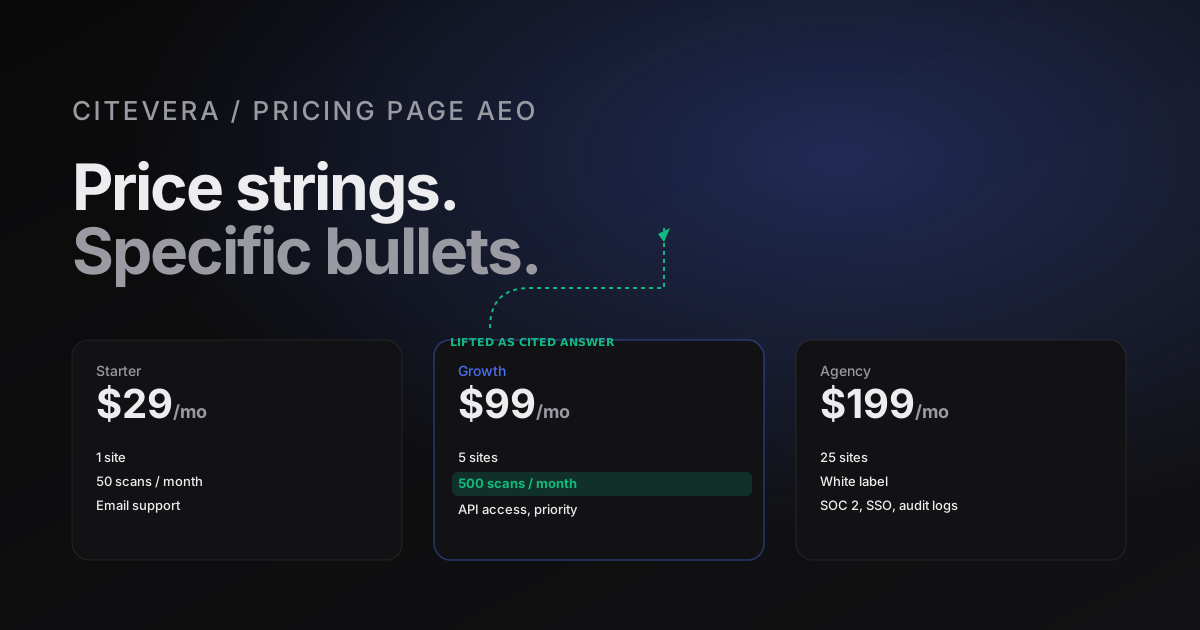
Pricing pages follow their own rules
A pricing page does not look like a blog post, and the AEO optimization playbook for it is different. Where a blog post is trying to be the answer to a generic question, a pricing page is trying to be the answer to a specific kind of query: "how much does X cost", "does X have a free tier", "what is included in X's Pro plan". Those queries route through answer engines differently, and the page structure that wins is not the structure that wins for blogs.
Here is what we see working on pricing pages across a few hundred Citevera audits, and what we see failing.
What gets cited
Answer engines lift three things from pricing pages with high frequency. Everything else on the page is essentially ignored from a citation perspective, even when it is useful for humans.
1. Price numbers, if they are unambiguous
If your pricing page says "Starter is $29/mo", that string is a high-value citation target. The engine wants to answer "how much is X's starter plan" and this is the exact form of the answer. If the price is displayed as a graphic, hidden behind a toggle, or qualified with "starting at" without a clear number, the citation rate drops sharply. The more your price reads like a number next to a label, the more often it gets quoted.
Concrete rule: for each tier, make sure the numeric price appears in machine-readable text with a clear currency and billing period. Use $29 not 29.00 USD, use /mo not "per month (billed annually at 348 USD)". The simpler the string, the higher the citation rate.
2. Feature lists, when they are short and specific
Bullet-point feature lists under each tier are cited when they meet two conditions: each bullet is short (5-12 words), and each bullet references a specific capability rather than a vague benefit. "Unlimited scans, 25 monitored sites, priority support" is citable. "Everything you need to grow" is not - it is marketing prose, and marketing prose reads as skippable to an extraction pipeline.
The paradox: the bullets that sound the most "on-brand" are usually the least citable. A bullet that reads like it belongs in a homepage hero is a bullet the engine will not quote. Rewrite for concreteness: replace "Enterprise-grade security" with "SOC 2 Type II, SSO, audit logs". The second version is citable. The first is not.
3. FAQ answers adjacent to pricing
Pricing pages with an FAQ block below the tier cards consistently out-cite pricing pages without one. Questions like "Can I switch plans?" and "What happens if I exceed my quota?" are exactly the queries an answer engine routes to a pricing page. Provide the answers in text, with FAQPage schema, and both the Q and the A get lifted.
Three to five FAQ pairs is the sweet spot. More than eight and the engine picks from the first few anyway; fewer than three and it feels like a stub.
What gets skipped
Three patterns common on pricing pages produce essentially no citation lift.
Testimonial blocks
A customer quote below the pricing grid is valuable for conversion but is almost never cited by AI. The reasons are structural: the quote is attributed to a person the engine does not have a reliable entity for, and the content of the quote is subjective ("this changed our business") rather than factual. Do not remove the quotes - they help humans - but do not expect them to do AEO work.
Comparison tables
Long feature-comparison tables that spread across rows and columns are rarely cited as a unit. The engine might lift one specific row if it happens to answer a query, but the table overall is too complex to extract cleanly. If you have a long comparison, build a short summary block above it that makes the headline differences explicit in prose. The prose block gets cited; the table acts as confirmation for humans who click through.
Social proof numbers
"Trusted by 10,000+ teams" is a number, but it is the wrong kind of number. Answer engines rarely quote vanity metrics because they lack source citations and the claim cannot be independently verified. Keep the line on the page for human readers if you like, but attach a source link if you want it to ever get cited.
Schema types for product pages
Product and pricing pages have a richer schema ecosystem than blog posts. The types that matter:
- Product with
offersnested beneath. Each pricing tier becomes anOfferentry withprice,priceCurrency,billingIncrement, andname. - Organization on the global site, not the pricing page specifically. Links the pricing page to your brand's entity.
- AggregateOffer if you want to express a range ("starts from $29/mo"). Use carefully - some engines treat ranges as less quotable than single prices.
- FAQPage for the FAQ block at the bottom.
- BreadcrumbList for navigation context.
Emit the schema inline as JSON-LD in the page head. Validate it against the Schema.org validator before shipping. Errors in pricing schema are silently ignored by engines but they show up in your audit, and they block you from collecting the schema-lift effect.
A concrete before-and-after
Here is a typical SaaS pricing page as we often see it, simplified:
# Pricing
Choose the plan that's right for you.

Starter
For teams getting started.
Sign up

Pro
For growing teams.
Sign up

Enterprise
For large organizations.
Contact sales
This page is essentially uncitable. No prices, no specific features, no FAQ, no schema. An engine asked "how much does X cost" cannot quote this page because there is nothing to quote.
The AEO-rewritten version:
# Pricing

Three plans. Monthly or annual billing. All include unlimited core features.

Starter - $29/mo
1 site. 50 scans per month. Email support.
Sign up

Pro - $99/mo
5 sites. 500 scans per month. Priority support. API access.
Sign up

Enterprise - $499/mo
25 sites. Unlimited scans. Dedicated account manager. SSO, audit logs.
Contact sales

## Pricing FAQ

### Can I switch plans?
Yes, any time. Prorated automatically.

### What happens if I exceed my quota?
You get a grace period of 20% over your plan's scan count, then additional scans are billed at $0.50 each.

### Is there an annual discount?
Yes, 17% off annual billing. Select annual on the sign-up page.
Same structural complexity. Dramatically higher citation potential. The engine can now answer the common pricing queries with direct quotes from the page.
Two mistakes to avoid
Hiding prices behind a toggle
A pricing page that requires clicking "see prices" or picking a plan from a dropdown hides the numbers from the initial HTML render. Some engines render JavaScript; some do not. Relying on client-side rendering for your most citable content is leaving citations on the table. Render prices in the server HTML.
Overloading the "most popular" tier
Many pricing pages have a middle tier labeled "most popular" with extra emphasis. That emphasis is fine, but do not let it lead to cramming extra content into that tier's card. The bullet list should still be scannable. An engine asked "what is in the Pro tier" wants a 6-bullet answer, not a 15-bullet answer.
Run a free audit to see how your pricing page scores on AEO
How Citevera scores pricing pages
The audit runs a pricing-page-specific check that looks at: price text visibility, feature-bullet specificity, FAQ presence, Product schema, and Offer counts. A well-structured pricing page typically clears 85 on the AEO axis on its own; a poorly-structured one sits below 60 regardless of how much effort went into the visual design.
Fixing a pricing page is usually a half-day exercise for one engineer and one copywriter. The delta is visible in citation rates within a month.
Frequently asked questions about product-page AEO
Should I put long-form educational content on my pricing page?
No. That is what your blog and docs are for. A pricing page should answer pricing questions crisply. Adding 2,000 words of educational content dilutes the page and lowers extraction efficiency on the numerical answers that belong there.
What if my pricing is custom or "contact sales"?
Publish a reference price range if you can. "Enterprise plans typically start at $500/mo" is more citable than "contact sales" with no number. If you truly cannot publish a number, provide a rich enough description of what custom plans include that the engine can cite the scope, even if not the price.
How do I handle feature changes without constantly updating schema?
Generate the schema from the same source of truth as the visual pricing grid. Most modern SaaS sites store pricing config in a YAML or JSON file that renders both the UI and the schema. The two stay in sync automatically.
Do prices in multiple currencies help or hurt?
They help for international citation but should be shown on dedicated country pages with their own URLs. Stuffing five currencies on one page confuses extraction. Use the Organization.areaServed schema field to declare regional coverage if you localize.