

The 35-point AEO checklist, explained
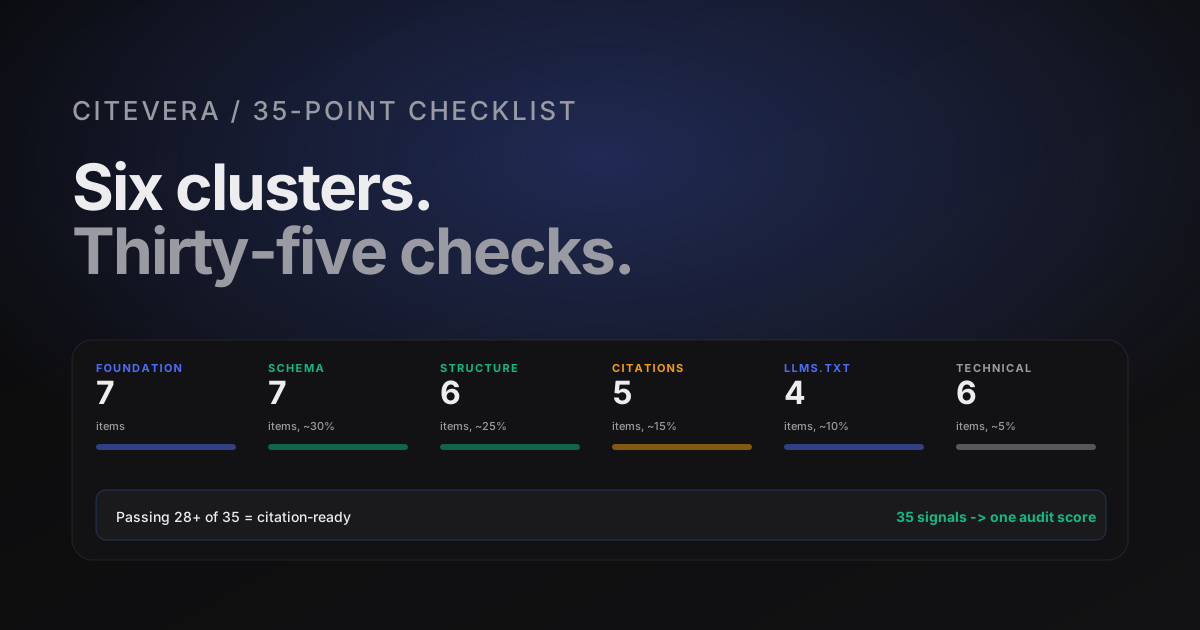
35 AEO signals organized into six clusters - the fundamentals Citevera's audit methodology draws on. Here is the full list with what each check measures, why it matters, and the typical fix effort. Use this as a self-audit reference.
The full list
These are the 35 AEO signals our audit methodology draws on. The list has not changed much since early 2025 because the fundamentals of AEO have not changed much; what has changed is the relative weight of some items. Here is the complete list as of Q2 2026, organized by cluster.
Each check has three parts: what it measures, why it matters to answer engines, and roughly what it costs to fix. Use this post as a reference when planning your AEO work.
Cluster 1: Foundation (7 items)
Foundation is the baseline - if any of these fail, nothing else matters much because the engine is not reading your content reliably.
1. HTML renders server-side
Measures whether the main content of each page appears in the raw HTML or requires JavaScript to render. Engines do not reliably execute all JavaScript. Fix effort: architecture change if the site is SPA-only, half day if it is a Next.js or Astro site with SSR available.
2. Robots.txt allows AI crawlers
Twelve named AI user agents have explicit allow rules. See the AI crawler user-agents post for the full list. Fix effort: 5 minutes.
3. No blanket disallow above allow rules
A User-agent: * with Disallow: / above specific allows is a common misconfiguration. Fix effort: 5 minutes.
4. Canonical URL per page
Every page declares <link rel="canonical"> pointing at its preferred URL. Engines follow canonicals and deduplicate across variants. Fix effort: template update, 30 minutes.
5. No mixed-content issues
HTTPS pages that load HTTP resources are flagged. Modern browsers block them, some crawlers skip them. Fix effort: audit resources, typically 1 to 2 hours.
6. Sitemap.xml reachable
A valid sitemap at /sitemap.xml listing canonical URLs. Most CMSes generate this automatically; some produce broken files. Fix effort: 15 minutes.
7. Robots.txt references sitemap
The Sitemap: directive in robots.txt pointing at your sitemap. Small but free. Fix effort: 2 minutes.
Cluster 2: Schema (7 items)
Schema is where the biggest citation lift comes from. This cluster moves AEO scores more than any other.
8. Organization schema on homepage
Declares the brand entity once, with name, url, logo, and sameAs links to major social and business profiles. Fix effort: 30 minutes.
9. WebSite schema on homepage
Declares the site entity, optionally with potentialAction.SearchAction if you have internal search. Fix effort: 15 minutes.
10. BreadcrumbList on every template
Hierarchical position declared for every page. Mechanical generator, see the BreadcrumbList post. Fix effort: 30 to 60 minutes.
11. BlogPosting on blog posts
Article-level schema for every blog post with author, datePublished, dateModified, headline. Fix effort: template update, 30 minutes.
12. FAQPage on pages with visible FAQs
FAQPage schema emitted only when the page has 3+ visible question-answer pairs. Fix effort: per-page tagging, 10 minutes each.
13. Product + Offer on pricing pages
Product schema with nested Offer for each tier. Fix effort: 1 hour per pricing page.
14. HowTo on procedural content
HowTo schema on tutorials with 3+ steps. Fix effort: 20 minutes per tutorial.
Cluster 3: Content structure (6 items)
Structure is what makes content extractable. Audits often surface issues here on sites that otherwise look fine.
15. Single H1 per page
Exactly one <h1> tag per page, used for the main title. More than one confuses the hierarchy. Fix effort: template and per-page cleanup, varies.
16. Logical H2 / H3 hierarchy
Headings step cleanly from H1 to H2 to H3 without skipping. Fix effort: content pass, 10 to 30 minutes per page.
17. Direct-answer lede in first 150 words
See the direct-answer-density post. First paragraph answers the title. Fix effort: 20 minutes per page.
18. Visible FAQ block on pillar pages
Every pillar page has a genuine 3 to 8 question FAQ section. Fix effort: 30 minutes of writing per page.
19. Word count in range
Pillar content is between 800 and 2,500 words. Very short pages are flagged; very long pages also get a soft flag. Fix effort: varies.
20. Image alt text present
Every image has an alt attribute with descriptive text. Fix effort: template sweep.
Cluster 4: Citations and authority (5 items)
This cluster is about whether the content can be trusted and verified.
21. External links to credible sources
At least 3 outbound links to authoritative sources on pillar pages, concentrated in the first half. Fix effort: retrofit pass, 15 to 30 minutes per page.
22. Stat claims have sources
Every specific number or percentage has a linked source nearby. Fix effort: content pass, 10 minutes per page.
23. Author attribution present
BlogPosting has an author field pointing at a Person with a name and ideally a link. Fix effort: template update, 30 minutes.
24. Date signals populated
datePublished and dateModified both present on every post. Fix effort: CMS configuration, 15 minutes.
25. Contact and about info discoverable
Reachable /about, /contact, and organization details. Engines use this as an authority signal. Fix effort: check that pages exist and are linked from the homepage.
Cluster 5: llms.txt and llms-full.txt (4 items)
The two files that most directly affect AI consumption of your site.
26. /llms.txt present
A well-formed llms.txt file at the domain root. See the llms.txt post. Fix effort: 1 to 2 hours.
27. /llms-full.txt present
A well-formed llms-full.txt under 100KB. See the llms-full.txt post. Fix effort: half day including generator setup.
28. llms.txt reflects current sitemap
The URLs in llms.txt resolve and are canonical. Fix effort: regeneration pipeline, ongoing.
29. llms-full.txt under size cap
The file is under 100KB and served with the right content type. Fix effort: prioritization pass when over.
Cluster 6: Technical AEO (6 items)
Mechanical checks on reachability and behavior.
30. Server response time under 2 seconds
Time-to-first-byte is reasonable for crawlers. Fix effort: varies.
31. HTTP status codes correct
200 for live pages, 301 or 302 only when actually redirecting, no 404s in internal links. Fix effort: link audit, 1 hour.
32. Structured data validates
All JSON-LD passes Schema.org validation with no errors. Fix effort: validator run + fix pass, 30 minutes.
33. Internal linking present
Every pillar page has at least a few inbound internal links from other pages on the site. Fix effort: content pass.
34. No orphan pages
Every indexable page is reachable from the homepage in a reasonable number of clicks. Fix effort: sitemap audit.
35. Page metadata complete
Every page has <title>, <meta name="description">, and Open Graph tags. Fix effort: template update, 30 minutes.
How to use this list
Three usage patterns we recommend.
As a pre-launch checklist
For new sites or major relaunches, run every item before going live. A site that clears all 35 before the first crawl tends to accumulate citations quickly once the engines index it. Ship-day is cheaper than retrofit.
As a quarterly audit
Once a quarter, run through the list and check whether any have regressed. Sites drift; plugins get removed, templates change, a well-meaning edit breaks a schema block. Quarterly is the right cadence to catch drift before it costs citations.
As a prioritization tool
When Citevera flags issues, the fix priority roughly follows: Foundation (any failure is critical) > Schema (highest lift) > Content structure > Citations > llms.txt files > Technical. Work top down. Most teams can close 80 percent of the gap in two weeks.
The scoring math
The 35 items do not contribute equally to the overall score. The current weights:
- Schema cluster: ~30 percent of score.
- Content structure: ~25 percent.
- Foundation: ~15 percent.
- Citations and authority: ~15 percent.
- llms.txt files: ~10 percent.
- Technical: ~5 percent.
The uneven distribution reflects what we measure actually moving citations. Schema and content structure are where the biggest effect lives. Technical signals matter as a floor but rarely as a lift.
Run a free audit to see your score on each of the 35 items
How Citevera measures each item
Each of the 35 checks has a specific pass/fail rubric, with some using a quality modifier when partial credit applies. The audit runs in 1-3 minutes for most sites across up to 10 pages per domain, aggregates the per-page results into the six cluster scores, and composes those into the overall AEO, GEO, and crawlability axis scores that appear in the report.
The checks are the same ones the scoring algorithm uses. There is no hidden magic; everything that contributes to your score is in this list.
Frequently asked questions about the checklist
Do I need to pass all 35 to be considered "AEO-ready"?
No. Most of the top-performing sites in our sample pass 28 to 32 of the 35. The floor for "citable" is roughly 25. Below 20, the site is effectively invisible to answer engines.
Does this list apply to every site type?
Mostly. E-commerce sites lean more on Product schema and have different FAQ patterns; documentation sites lean on HowTo and breadcrumbs. The cluster weights shift slightly, but the 35 items apply universally.
How often does the list change?
Slowly. In 2025 we added two items (Applebot-Extended in the robots.txt allow list, llms-full.txt). In 2026 we have added one (Perplexity-User handling). Most of the list has been stable since 2024.
Is there a shorter version if I only have an hour?
Yes. The five highest-leverage items, in order: direct-answer lede on top pillar pages, FAQPage schema on pages with visible FAQs, BreadcrumbList across templates, the AI crawler allowlist in robots.txt, and a llms.txt file at the root. That list covers most of the low-effort wins.